
Updated August 31, 2026
How to Use the SAT Bluebook App for SAT Prep (Full Guide)
Bonus Material: SAT Score Ranges for 500+ Top Schools
If you’re planning to take the SAT, you might already have heard of Bluebook. Since the SAT shifted to a digital format, students have taken the test through the Bluebook app.
So what do you need to know about using Bluebook on test day? And how can you use it for your test prep before then?
We’ve lined up everything you need to know, from how to get set up in the app to using it to make your personal study plan and work towards your SAT goal score.
First, find your top college choice on our list of the SAT score ranges for over 500 schools so that you know what SAT score you need to aim for in the first place.
Then keep reading for a full guide to using Bluebook for the SAT.
Jump to section:
What is Bluebook?
How to Set Up the Bluebook App
How to Use Bluebook to Take the SAT
How to Use Bluebook for Your SAT Prep
What’s Not in Bluebook: Extra SAT Prep Resources
Next Steps
What is Bluebook?
Bluebook is an app that lets you take the SAT on your personal device (either a laptop or a tablet).
If you don’t have a suitable device, then you’ll take the SAT on a school device – ask your school for more details.
The app also includes practice resources, including full-length SAT practice tests.
After downloading and opening the Bluebook app (which we’ll go through in a minute), you’ll see a home screen like this:

How to Set Up the Bluebook App
You’ll want to download Bluebook well before test day.
Here’s where you can download the Bluebook app. If you’re having trouble, take a look at the College Board’s instructions on how to download Bluebook.
Before downloading, first make sure that your device meets the requirements to run Bluebook.
| If you’re testing on a(n)… | You need this much storage: | And here’s the software version you need: | You may use… | You may not use… |
|---|---|---|---|---|
| A Windows laptop | 1 GB of space | Windows 11 (strongly recommended – Bluebook will work with Windows 10 until Fall 2026, but it’s not recommended) | An external mouse | An external keyboard |
| A Windows tablet | 1 GB of space | Windows 11 (recommended – Bluebook will work with Windows 10 until Fall 2026, but it’s not recommended) | An external mouse; an external keyboard (strongly recommended) | |
| A Mac laptop | 1 GB of space | Minimum MacOS 12.0; maximum MacOS 15.6 (for text-to-speech users: minimum MacOS 13.0) | An external mouse | An external keyboard |
| An iPad | 250 MB of space | Minimum iPadOS 16; maximum iPadOS 18.6 (iPadOS 17–17.0.3 is not supported) | An external mouse; an external keyboard (strongly recommended) | |
| A Chromebook | 1 GB of space | Minimum ChromeOS 132 | An external mouse | An external keyboard; Your personal Chromebook. Bluebook only works on school-issued Chromebooks. |
It’s always a good idea to double-check your device requirements. The College Board provides all the details about approved devices, so make sure you’re set up well before test day.
Once you’ve downloaded the Bluebook app, use your College Board login to sign in.
How to Use Bluebook to Take the SAT
Before the Test
The most important feature of the Bluebook app is allowing you to take the SAT on the test day you registered for.
Your test will show up in the app when:
- you enter the code you received from your school (for school-day exams)
- or 5 days before test day (for weekend exams).
Once your test shows up in Bluebook, you need to complete your exam setup before test day. We recommend doing this as soon as possible – don’t wait until the night before the SAT!
Click on your test to complete your exam setup in Bluebook. Once you’re done, you’ll get an admission ticket. You need this to be allowed into the test, so keep it safe.
You can show your admission ticket on your phone or device on test day, but we’d recommend printing it out just in case.

During the Test
During the test, you’ll see a toolbar at the top of the screen with in-app tools.
- For the Reading & Writing section, you’ll see a tool in the top-right corner that allows you to highlight or annotate on the screen.
- For the Math section, you can click on “reference” to view your formula reference sheet and on “calculator” to open the DESMOS graphing calculator tool.
The app also includes a countdown clock that shows how much time you have left for the section. (If this stresses you out, you can click “Hide” to turn it off!)
Finally, you’ll be able to flag questions to come back to. Once you reach the end of a module, you’ll see an overview of which questions you’ve answered, left open, or flagged to return to.
Past tests will still show up in Bluebook, so you’ll be able to see an overview of your attempts and decide which SAT scores you want to send to colleges. Bluebook’s “BigFuture” tool (at the bottom of the app’s home screen) will also help you keep track of your college or job applications and goals.
How do you decide which scores to send to colleges? Compare your score to our overview of the average score ranges for 500+ schools (at the button below) to see where you’re a competitive applicant and where you might want to boost your score before application season.
How to Use Bluebook for Your SAT Prep
As well as the real SAT, the Bluebook app also includes helpful SAT prep resources for you to use when studying for the test.
Test Preview
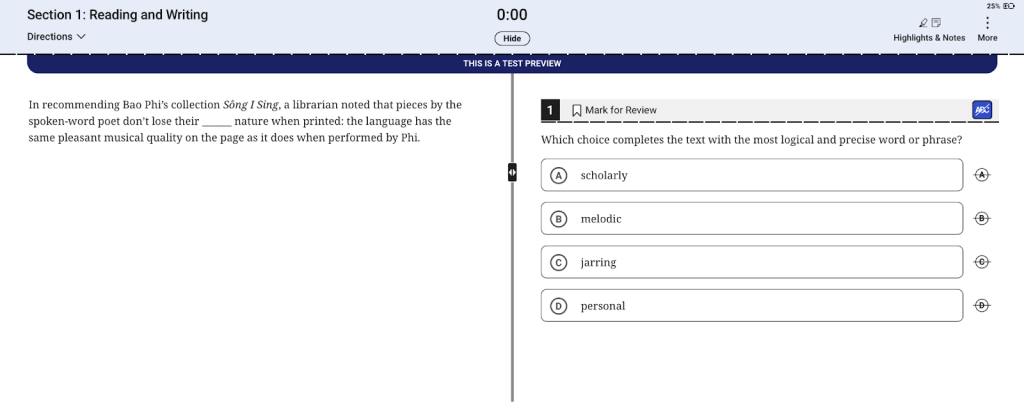
If you’re at the very beginning of your SAT prep, we’d recommend starting with Bluebook’s “Test Preview” feature. It’s not timed, and it’s a lot shorter than a real SAT test.
Take the time in the Test Preview to explore Bluebook’s features. Get comfortable using the in-app DESMOS calculator and the highlighter tool.
Official SAT Practice Tests
The most important resource in Bluebook is its official, full-length practice tests. The app includes 4 SAT-style tests to help you practice the content, format, and timing of the exam before test day.
Once you’re familiar with the test format from Test Preview, take a full-length, timed practice test as a diagnostic test. This will help set your baseline score.

Schedule the remaining full-length practice tests between your diagnostic test and the real SAT. Say you want to raise your baseline score by 120 points. That means that each time you take a practice test, you’re aiming for a score that’s about 40 points higher than last time.
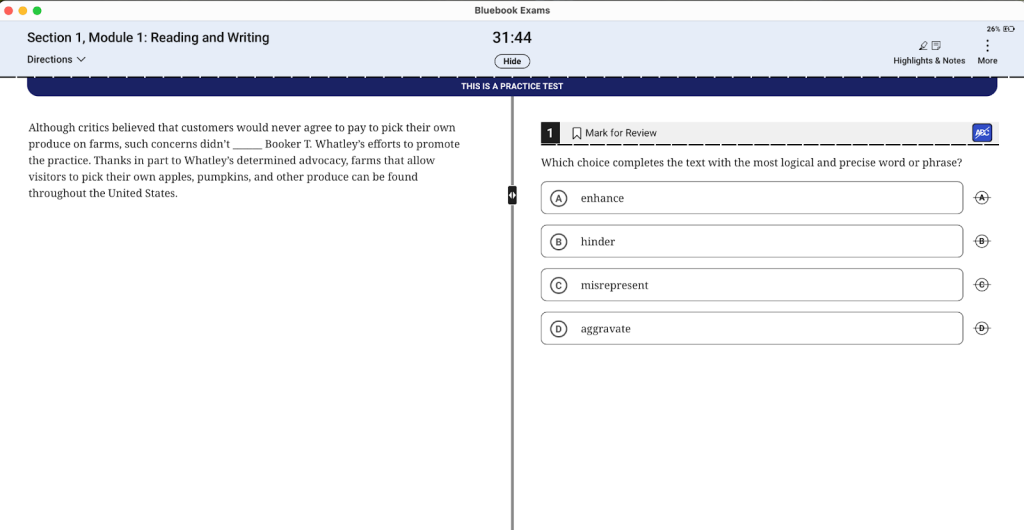
Once you enter the practice test, you’ll see that it looks the same as the Test Preview, but with more questions – and a ticking timer.
After completing your test, you’ll be able to view your score and details about your correct and incorrect answers on the College Board website. You can see your progress over time by comparing your previous practice tests: just click on “Past” next to “Practice and Prepare” in Bluebook, then click on “View My Responses.”

On the College Board website, you’ll see your score and get links to relevant practice questions for the skills you need to work on.

You’ll also see a breakdown of where you missed points:
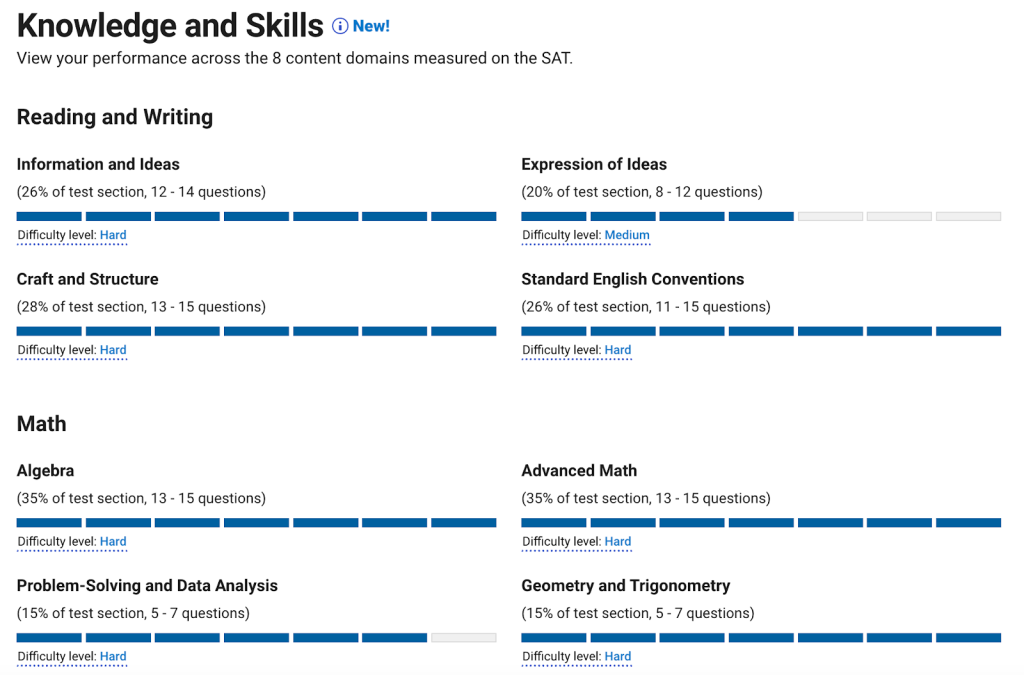
You can even see exactly which questions you got wrong. It’s a good idea to add these questions to your personal question bank and practice them again later.

What’s Not in Bluebook: Extra SAT Prep Resources
Bluebook is a great resource. But if you’re aiming for a top score, you’ll want more practice.
How do you get there? The College Board’s online question bank is a great place to start. So is Khan Academy’s (free) official SAT prep course. We’ve also researched the best SAT prep books out there, based on two decades of tutoring experience.
If you want to learn key test-taking strategies, here’s our guide to the strategy for every single SAT Reading & Writing question type, as well as 12 test-taking strategies that work for almost any SAT question.
One-on-one support can also make a big difference. Take a look at our list of the 15 best SAT tutoring services, or give us a call about SAT tutoring.
Next Steps
Ready to get started on your SAT prep? Learn more about the 2 sections of the SAT and how the SAT is scored.
We’ve been preparing students for the SAT for over 20 years, and PrepMaven’s SAT tutors have all been trained on the specifics of the SAT. Learn more about our programs here, and get in touch with our team for a free consultation to figure out whether the SAT MasterClass or individual tutoring could be helpful for you.
Top SAT Posts
- The 14 Best Online SAT Tutoring Services
- The Key Strategy for Every SAT Reading & Writing Question Type
- What’s a Good SAT Score for 2026?
- What’s a Good SAT Score for the Ivy League?
- The 11 Best SAT Prep Books
- The 2 Sections of the Digital SAT
- SAT Grammar Rules for a Perfect Score
- 5 Tips for SAT Reading Questions
- 25 of the Hardest SAT Math Questions
- Digital SAT Scoring Guide
- What’s on the SAT Math Section?
- The 12 Best SAT Prep Courses

Ro
Ro is an experienced test prep (SAT/ACT), college essay, and academic (English, French, Latin & math) tutor who has been tutoring since college.
Her test prep students have scored in the top 1% on the SAT and regularly see score increases of 100+ points over a few months. She especially enjoys helping her academic tutoring students to find enjoyment in subjects they used to struggle with.
Ro holds a BA summa cum laude in Comparative Literature from Princeton University and an MA in Law & Religion from KU Leuven, Belgium